
How to Build a Lead-Generating ROI Calculator with AI in One Afternoon
A step-by-step tutorial: build an interactive ROI calculator lead magnet with Lovable, store leads in a database, track conversions in GA4 and launch it — no developer required.
Key Takeaways
- →Interactive lead magnets like ROI calculators typically convert 2–3x better than static PDF downloads.
- →You can build a working calculator with lead capture in an afternoon using an AI app builder.
- →Show part of the result before asking for an email — value first, gate second.
- →Store every lead in a database and track the submission as a GA4 conversion from day one.
- →Iterate weekly: test the headline, the number of fields and where the email gate sits.
 Lovable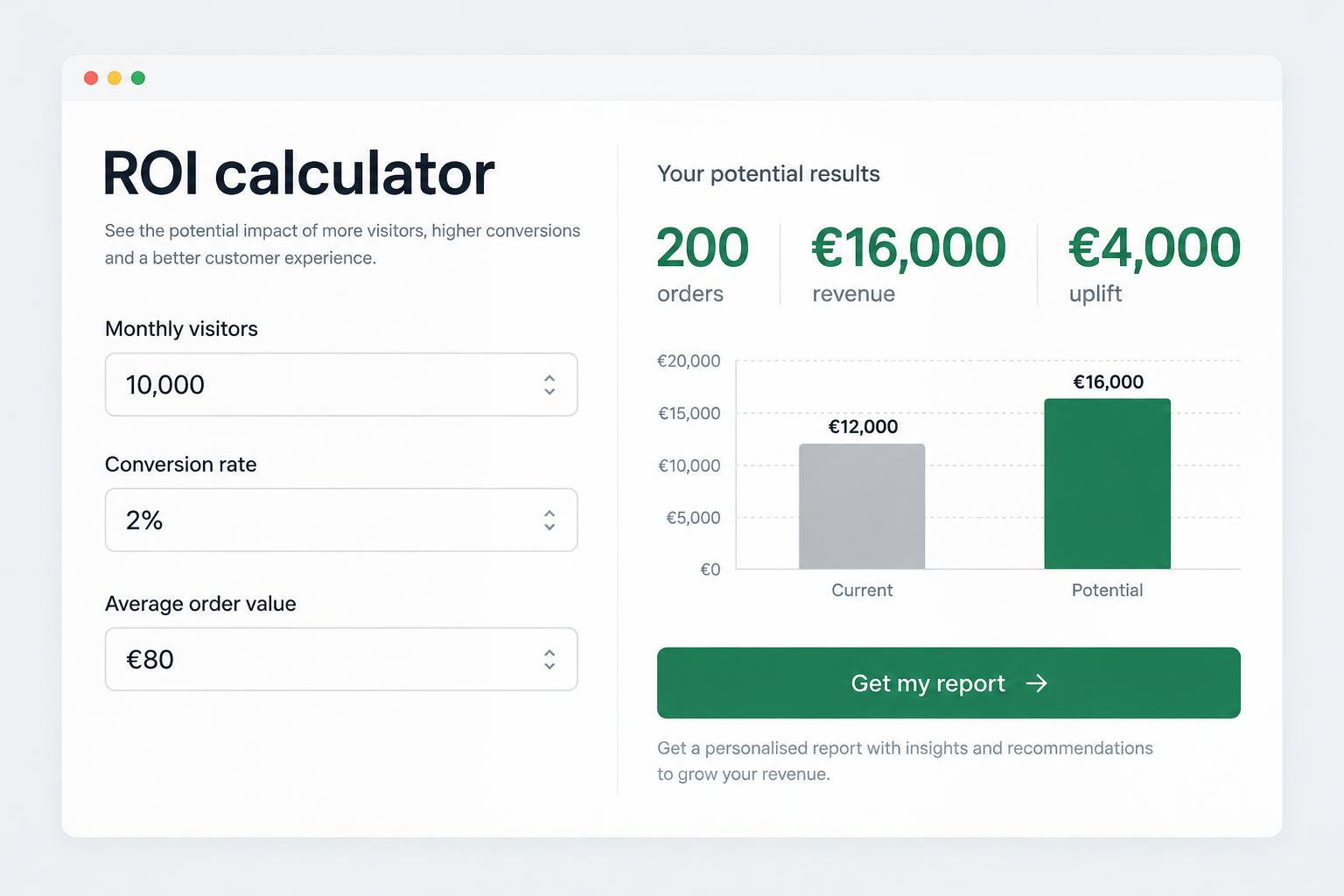
- 01
Define the goal
Choose the audience, action and success metric.
- 02
Build and review
Create the page, connect the data and test the experience.
- 03
Publish and measure
Launch the asset and track conversions.
Disclosure: this tutorial contains a referral link to Lovable. Signing up through it gives us both bonus credits at no cost to you.
Why an ROI calculator beats a PDF
Static ebooks ask for trust up front and deliver generic value. A calculator delivers a personalised answer — "you are losing €4,200/month to cart abandonment" — which is both more useful to the visitor and a far stronger sales signal for you.
| Lead magnet type | Typical landing page conversion | Lead quality signal |
|---|---|---|
| PDF ebook | 10–20% | Low — only an email |
| Webinar registration | 20–30% | Medium |
| Interactive calculator / quiz | 30–50% | High — you see their numbers |
Step 1: Define the formula
Pick one painful, quantifiable problem your service solves. For a CRO agency: monthly revenue lost to a below-benchmark conversion rate. Inputs: monthly visitors, current conversion rate, average order value. Output: extra revenue at the industry benchmark rate. Use benchmarks from our ecommerce CRO guide.
Step 2: Build it with a prompt
Create a free Lovable account and start with a prompt like this:
Example prompt: Build a single-page ROI calculator for an ecommerce CRO agency. Inputs: monthly visitors, conversion rate (%), average order value (€). Show the monthly revenue gap versus a 3% benchmark as a large animated number with a bar chart. Below it, a form (name, work email, company) to receive the full report. Save submissions to the database. Clean, trustworthy design.
Review the live preview and refine in plain language: "make the result card more prominent", "add a currency selector", "show an error if conversion rate is above 100%".
Step 3: Capture leads properly
- Store leads in a database table, not just an email notification — notifications get lost.
- Save the calculator inputs alongside the lead so sales can open the conversation with their numbers.
- Add a privacy notice and consent checkbox for GDPR.
- Validate the email field and show a clear success state.
Step 4: Track it as a conversion
Fire a GA4 event (for example generate_lead) on successful submission and mark it as a key event. Without this you cannot compare the calculator against your other acquisition channels. Our analytics services cover full funnel tracking.
Step 5: Launch and iterate
- Publish and connect your own domain.
- Link the calculator from relevant articles and service pages.
- Run a small paid campaign to get initial data.
- Test one change per week: headline, number of inputs, or showing the full result before vs after the email gate.
Pro tip: show the headline number immediately and gate only the detailed breakdown. Gating everything kills completion rates.
Ready to build yours?
Start building with Lovable — our referral link gives you bonus credits. If you would rather have us design the funnel and the experiment plan around it, talk to our team.
Recommended Tools
Lovable
Build the calculator, database and hosting from plain-language prompts. Sign up through our link for bonus credits.
Explore LovableRelated Articles
Best Email Marketing Tools for Ecommerce Retention: Klaviyo vs Mailchimp vs Brevo
Klaviyo, Mailchimp and Brevo compared for ecommerce: automation, segmentation, SMS, pricing and which one drives the most repeat revenue.
Read ArticleBest CRO and Heatmap Tools: Hotjar vs Microsoft Clarity vs VWO (2026)
Which conversion optimisation stack should you use? Heatmaps, session recordings and A/B testing tools compared by use case and budget.
Read ArticleShopify vs WooCommerce: Which Converts Better in 2026?
Shopify and WooCommerce compared on checkout conversion, speed, apps, total cost and growth potential for European stores.
Read ArticleBest SEO Research Tools in 2026: Semrush vs Ahrefs vs Free Options
An honest comparison of Semrush, Ahrefs and free SEO tools: data quality, pricing, best use cases and which one pays for itself fastest.
Read ArticleWant lead magnets that actually convert?
We design, build and optimize interactive funnels backed by data and testing.
Explore CRO services